Independent concept · not affiliated with Cal.com
TimeBridge
Making cross-timezone scheduling easier to understand.
TimeBridge is an independent concept. It is not affiliated with or connected to Cal.com, and its availability and bookings are simulated in the browser.
The product problem
When a host works 9–5 in India, a guest in Los Angeles is offered times around midnight — and nothing on the page says why.
I checked this on a real booking page using my own Cal.com event (October 2026). The conversion is correct: slots appear in the guest’s zone and the confirmation shows Los Angeles time. What’s missing is context. The flow I tested showed no host-local time and no explanation of the gap.
What this is not
Cal.com’s booking flow isn’t broken or inaccessible; the gap is context, not correctness. And it isn’t yet established that guests are confused by it — no user research has been done.
Design hypothesis
Scheduling interfaces can show mathematically correct times while failing to explain why those times look unusual. If the page says, at the moment it matters, what a time means for the other person, guests can trust an odd-looking slot without extra steps.
The constraint I set: add as little as possible. Context should appear when it explains something and stay out of the way otherwise.
Interaction decisions
- 01
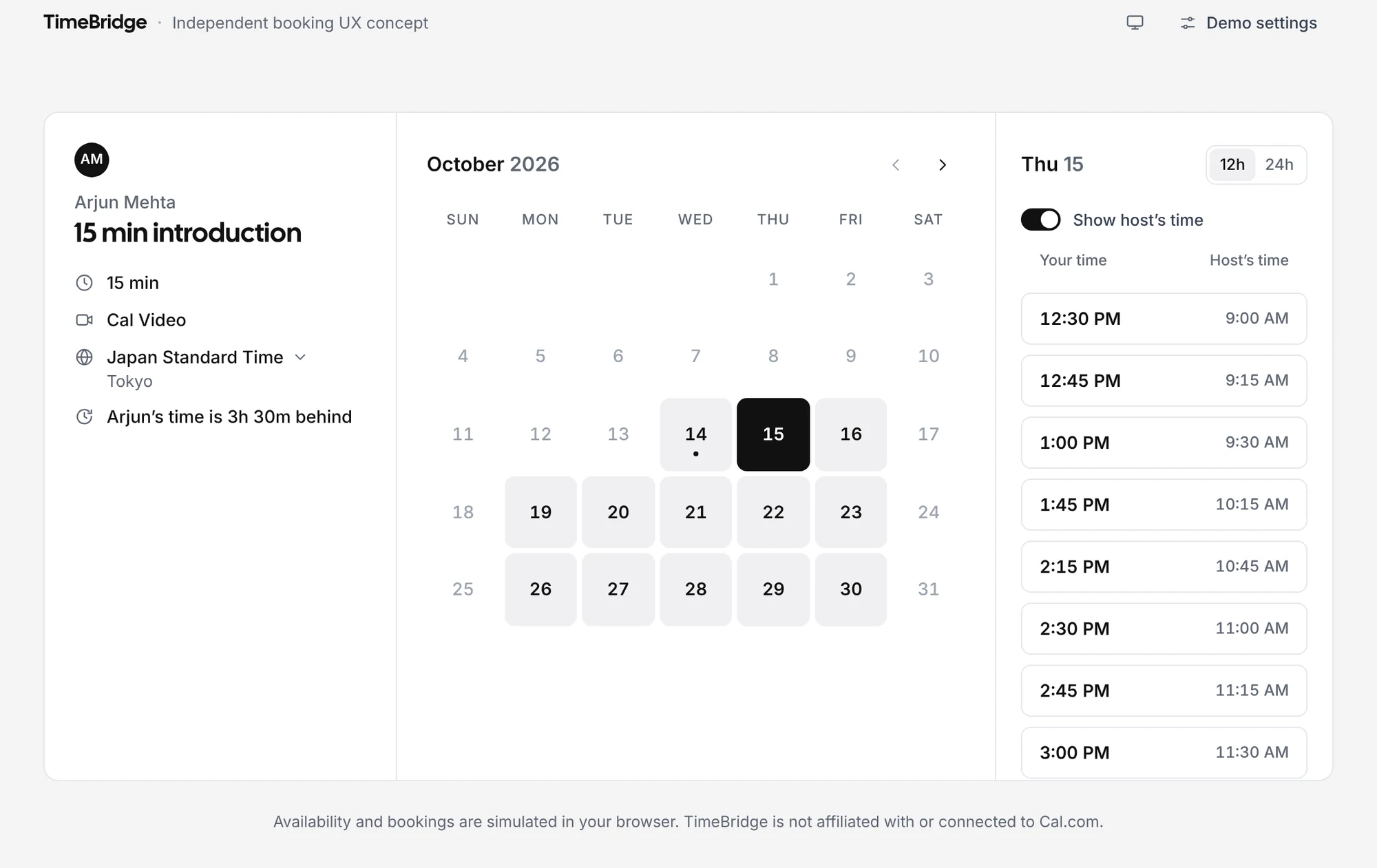
One line of context, computed for the date being viewed.
“Arjun’s time is 3h 30m behind” sits with the event details. It’s worked out for the selected date, not today, so it changes correctly after a daylight-saving change instead of quietly going stale.
- 02
The host’s time on demand, not by default.
A switch adds the host’s time beside each slot. Guests who need the comparison get it in one action; everyone else keeps a single, uncluttered list.
- 03
A clock-change note only when one falls in between.
If a clock change lands between today and the chosen date, one short line says so, with the plain explanation inside a native disclosure — keyboard and screen-reader behaviour come with the element rather than being rebuilt.
- 04
Repeated local times stay distinct.
On a fall-back day (Los Angeles, 1 November 2026) 1:00–1:59 AM happens twice. Every slot remains a distinct UTC instant, and the repeated times are labelled so two identical-looking buttons never mean the same thing.
- 05
One zone per place in the time-zone picker.
The picker is a Base UI Combobox over the browser’s own IANA list. Legacy and current ids (Asia/Calcutta and Asia/Kolkata) collapse into a single entry, so people don’t have to guess between duplicates.
The working interface
A guest in Tokyo books a 15-minute introduction with a host in Bengaluru, in three steps: pick a slot, add details, confirm. The confirmation repeats the time in both zones and offers Google Calendar and .ics. Every screenshot below is captured from the running app.
Architecture and components
React 19 and TypeScript on Vite, with Base UI headless primitives — the time-zone picker, for example, is a Base UI Combobox — styled from a small token file. Time logic lives outside the components, so it’s tested directly without a browser.
- Components
- MonthCalendar, SlotList, TimeComparison, TimezonePicker, ClockChangeNote, BookingForm, Confirmation, ErrorBoundary
- State
- useBooker — the booking flow’s state in one hook
- Time logic
- lib/time and lib/bridge — IANA conversion with Intl, offsets per date, clock-change and repeated-time detection
- Data
- simulatedBookingService — generates availability in the host’s zone; nothing calls a real backend
- Styling
- tokens.css design tokens for both themes; contrast pairs are unit-tested
Accessibility
- Keyboard. A full booking works from the keyboard alone: arrows, Home/End and PageUp/PageDown in the calendar grid, a single tab stop for the time list, and Escape order in nested popups.
- Focus management. Focus moves deliberately after each step change, after Back, after a booking conflict and after a crash, and returns where it came from.
- Contrast. Text (1.4.3) and non-text (1.4.11) pairs are tested with the WCAG formula; field edges, the switch and the selected 12h/24h segment are measured in the browser in both themes.
- Reflow and motion. No horizontal scroll from 1440 px down to 375 px, 24 px minimum targets, and reduced motion respected.
Not yet done
TimeBridge targets WCAG 2.2 AA, but passing automated checks isn’t a conformance claim. It hasn’t been tested with a screen reader yet.
Testing and verification
- Unit · Vitest
- time conversion, DST in several zones, the Los Angeles fall-back day, locale formatting, date selection, booking, contrast
- End-to-end · Playwright
- booking flow, layout and reflow, locale + DST, error-boundary recovery — desktop and mobile projects
- Accessibility · axe-core
- WCAG 2.0–2.2 A/AA rules across the calendar, menus, open selects, form errors, confirmation and the error screen, in light and dark
- CI workflow
- configured for GitHub Actions: npm audit, typecheck, lint, unit tests and build, then Playwright in Chromium, Firefox and WebKit
Locally the end-to-end suite has been run in Chromium; the configuration also defines Firefox and WebKit.
Known limitations
- Simulated data. Availability and bookings are generated in the browser; nothing connects to Cal.com.
- Unvalidated. The hypothesis hasn’t been tested with guests yet, so there are no outcome claims here.
- Screen readers. Not yet tested with VoiceOver or NVDA.